Have you ever been at a dinner party, heard about a “must-watch” documentary, and quickly scribbled it down on your phone? Most of us store our recommendations in Notes App folders, thinking we’ll get back to them during our next free weekend. However, the reality is that these digital scribbles rarely see the light of day. Instead of being a helpful resource, your Notes app often becomes a graveyard for great content.
In this deep dive, we will explore the psychological and technical reasons why the standard mobile note-taking habit is the enemy of culture curation, and how you can transition to a system that actually works.
The Chaos of Recommendations in Notes App
The primary issue with keeping recommendations in Notes App lists is the lack of structure. Notes apps are designed for quick thoughts, shopping lists, and temporary memos—not for curating a digital lifestyle. When you save a movie title next to a grocery list or a work memo, the context is immediately lost.
The Problem of Contextual Decay
When someone tells you, “You have to watch The Bear,” they usually provide a reason: “the cinematography is incredible” or “it captures high-pressure environments perfectly.” When you put those recommendations in Notes App files as just a name, that emotional hook disappears. Two weeks later, you see the text “The Bear” and feel nothing. Without the “why,” the “what” becomes clutter.
Zero Categorization and Search Fatigue
Movies, books, and podcasts all end up in one giant, messy scroll. Most mobile notes apps do not allow for easy tagging or folders within a single note. If you have been collecting recommendations in Notes App for over a year, you likely have a “Master List” that is 300 lines long. Searching through this while sitting on your couch on a Friday night feels like work, not relaxation.
The Psychology of “Analysis Paralysis”
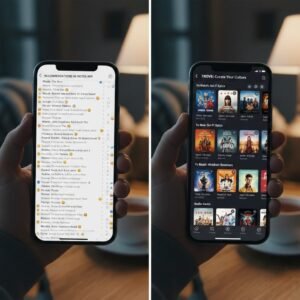
Why is it that we have 50 items on our list, yet we still spend 45 minutes scrolling through Netflix? This is known as Analysis Paralysis. When your recommendations in Notes App are presented as a flat list of text, your brain has to work too hard to visualize what each item is.
Cognitive Load and Decision Fatigue
A list of 50 text items requires your brain to perform “retrieval” for every single line. What was that about? Who directed it? Is it a comedy or a drama? By the time you’ve processed the first ten, you’re tired of making decisions. A dedicated curation tool like Trove solves this by providing visual posters and metadata, reducing the cognitive load and making the decision-making process instant.
Why Your Notes App is a Digital “Black Hole”
We often use our phones as an extension of our memory. This is called “cognitive offloading.” When we put recommendations in Notes App folders, we tell our brains, “I don’t need to remember this anymore; it’s safe there.”
The problem is that the Notes app is a “passive” storage system. It doesn’t remind you of what’s inside. Unlike a physical bookshelf or a curated gallery, the digital note stays hidden until you manually go looking for it. Over time, these notes become “dark data”—information you own but never use.
The Illusion of Productivity
Adding recommendations in Notes App feels productive in the moment. It feels like you’re building a library. But a library without a librarian is just a pile of books. Without a system to sort, prioritize, and remind you of your interests, you aren’t actually curating; you’re just hoarding text.
How to Migrate from Notes to a Better System
If you have years of recommendations in Notes App that you want to save, the migration process can feel daunting. Here is a step-by-step guide to cleaning up the mess.
Step 1: The Great Audit
Go through your current list and be ruthless. If a recommendation has been sitting there for more than six months and you can’t remember who suggested it or why you wanted to see it, delete it. If it was truly important, it will find its way back to you.
Step 2: Categorize by “Vibe”
Don’t just sort by “Movie” or “Book.” Sort by “Mood.” Create sections for “High Energy,” “Educational,” “Comfort Watch,” or “Deep Reads.” When you move your recommendations in Notes App to a structured environment, this metadata is what helps you choose content later.
Step 3: Add Visuals
A picture is worth a thousand words of notes. Seeing the cover art of a book or the poster of a film triggers a different part of the brain than reading the title. This is why Trove focuses on a visual-first interface.
The Role of Curation in the Modern Era
We are living in an era of “content abundance.” There is more high-quality media available than any human could consume in ten lifetimes. Because of this, the most valuable skill you can develop is curation.
Simply saving recommendations in Notes App is a relic of the early internet. In 2026, we need tools that help us filter the noise. According to a study on Digital Curation Trends, users who use dedicated organization tools report 40% higher satisfaction with their leisure time compared to those who use general-purpose notes.
Building Your Personal “Trove”
A “Trove” isn’t just a list; it’s a reflection of your taste. When you move away from messy recommendations in Notes App, you start to see patterns in what you enjoy. You might realize you’ve saved ten documentaries about oceanography or five books about stoicism. This self-awareness allows you to seek out even better content in the future.
Comparison: Notes App vs. Dedicated Curation Tools
| Feature | Notes App | Dedicated Tool (Trove) |
| Visuals | None (Text only) | Rich Posters & Trailers |
| Organization | Manual/Cluttered | Automatic Categorization |
| Sharing | Copy/Paste Text | Social Profiles & Links |
| Reminders | None | “What to watch” prompts |
| Context | Easily Lost | Preserved via Metadata |
Conclusion: Reclaim Your Culture
It is time to admit that storing recommendations in Notes App isn’t working for you. It’s a habit that leads to forgotten stories and missed inspirations. By choosing a dedicated curation tool, you ensure that every great suggestion you receive actually gets the attention it deserves.
Stop the scrolling cycle today. Check out our latest guide on how to build a better watchlist and start curating your culture properly. You can also explore Wired’s take on the best organization apps to see how the industry is moving away from basic text files.
Your media consumption defines your perspective—don’t let that perspective get buried in a “New Note 43” file. Move your recommendations in Notes App to a place where they can thrive.